
How to use this tool
Use Global Seller Time to quickly decide what to do right now, plan across time zones, save daily notes, and reuse workflows — all in one place.
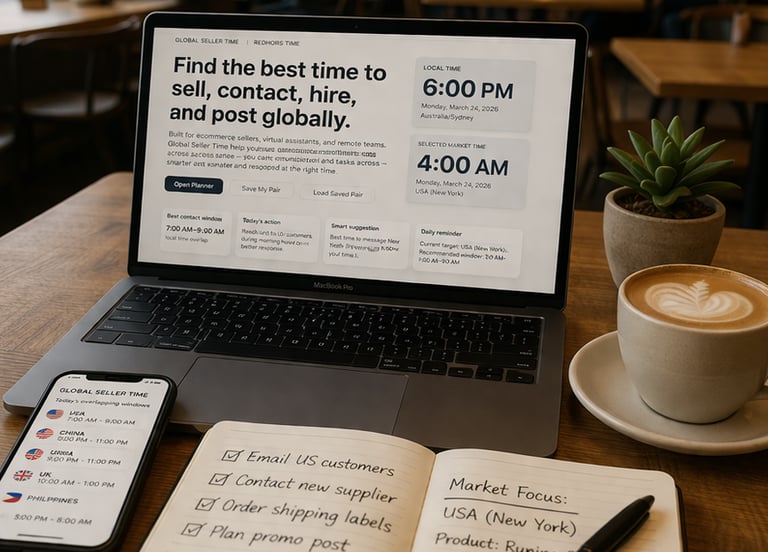
1. Choose your base
Select your location.
2. Choose your target
Pick the country, market, or person you want to work with.
3. Pick your goal
Choose what you want to do (customers, supplier, team, content, or meeting).
4. Follow the best time
Use the recommended time, avoid hours, and next step to act at the right moment.
5. Save and reuse
Save your notes and workflows so you can use them again anytime. your text here...
Frequently Ask Questions
What is Global Seller Time?
Global Seller Time is a smart planning tool that helps you decide the best time to work, contact people, and manage tasks across different time zones.
How does it work?
It compares your time with your target market and shows your best time, hours to avoid, time difference, and what you should do right now.
Who is this for?
It’s built for ecommerce sellers, dropshippers, remote teams, freelancers, and anyone working across different countries.
Get quick answers on how Global Seller Time works, how to plan across time zones, and how to use the tool effectively.
Do I need to update for daylight saving time?
No. The tool automatically adjusts for daylight saving using real-time browser data.
What is the best time to contact customers?
Usually during your target market’s working hours. The tool highlights the best window so you can reach people when they are most active.
Can I save my workflow?
Yes. Your settings, notes, and workflows are saved in your browser so you can quickly reuse them anytime.
Global Seller Insights
Actionable tips, strategies, and tools to help you work smarter across time zones and grow your global business.Write your text here...
Global Seller Time
Global Seller Time is a practical tool designed for ecommerce sellers, remote teams, and global businesses.
Plan your work, communicate across time zones, and make better decisions with simple, real-time tools you can rely on every day.
About Us
Link
© 2026. Global Seller Time | All rights reserved.
No login required • Free to use • Works worldwide
All Tools
Other Useful Resources